
7 ways facilities management software improves your workday
Facilities managers who have already completed a successful software implementation look back and wonder: why didn’t they choose a CMMS (or computerized maintenance management system) sooner?
With a shudder, they remember what their workday was like before having facilities management software in place: desks littered with maintenance requests, voicemails full of disgruntled calls about incomplete repairs, and equipment breakdowns that meant someone had to dig through file drawers to find the right manual.
After implementation, these same managers enjoy streamlined processes that allow them to stay one step ahead rather than play catch up all day long. With data at their fingertips, they’re empowered to make better informed decisions and take pride in running an organized, efficient and insightful department.
In a nutshell, they consider the decision to transform their operations with a facilities management solution the key to improving their work day exponentially.
7 Ways Facilities Management Software Improves Your Workday
1. Managing work orders is no work at all
Unfortunately, many businesses find themselves repeating the same ineffective cycle for handling work orders. Someone jots down a maintenance request, hands it off to someone else who reviews it and assigns the job to a technician. The tech, already swamped with other work orders from multiple departments, reads it and quickly realizes some critical information is missing. They put the request aside for later and forget about it.
Comprehensive facility management software includes a work order tool that streamlines communication, ensuring that each maintenance request is addressed and includes all the necessary information for timely completion of the job.
Authorized users log into a secure portal to submit requests. To write up an order, they follow a template with pull-down menus and check boxes so all the necessary details are organized and easy to find. Then, in minutes — from a computer, tablet or smartphone — they can approve, assign and prioritize the workflow.
No longer will you have to constantly check the inbox on your desk, phone or email for maintenance requests. You can check on the status of a work order from wherever you happen to be.
2. Guesswork is replaced by data-driven decision making
Choosing to repair or replace an asset is a tough decision, and one that should be made based on your experience and a thorough analysis of historical data and trends. But if you’re still depending on traditional methods of record keeping like folders in a filing cabinet or spreadsheets on one computer, it takes too much time and energy to pull together and analyze the information. You need to be able to quickly identify where your budget should be allocated.
With facilities management solutions, the data you need is readily accessible. You can run reports to show exactly what an asset costs in terms of parts, labor and materials. You’re also better equipped to set up a preventive maintenance schedule when you know how often an asset breaks down and what types of repairs have been needed in the past.
3. Compliance becomes uncomplicated
When it comes to something as important as compliance, you want to know that you can meet it and verify that you did so. Typically, many items on your compliance list require periodic visual checks that are completed internally, as well as semi-annual or annual inspections carried out by an independent licensed professional.
A CMMS facilitates both requirements. You can schedule a preventive maintenance work order ahead of time in your CMMS. This order can include step-by-step instructions, checklists, images of the inspection tags and even interactive floor maps–which helps immensely when a new tech has been assigned the job.
Then, you can set up your system to send email reminders to third-party vendors who will be informed of what you need inspected and when. Every compliance requirement will be taken care of on time — and you’ll have the records to prove it.
4. Preventive maintenance stays on schedule like clockwork
The days of retroactively managing your buildings and assets are over. On-demand work orders, unexpected production halts, and wasted time and money can be avoided.
With a facilities management solution in place, you’ll have insight from historical data to create a preventive maintenance schedule that will keep your facilities and equipment running like a well-oiled machine. By setting up both time- and meter-based preventive maintenance orders, you’ll prolong the performance of your assets and reduce the total cost of ownership.
5. Out of office but in touch
If you’re like most facility managers who are still dependent on manual processes and spreadsheets, you’re caught between having to be in the office (where you can get your hands on the information) and being out in your facility (where you’re closer to the action).
One of the prime benefits of facilities management software is how much easier it makes a manager’s life. Cloud-based solutions give you the freedom to work remotely and away from your desk. You can oversee operations from anywhere (communicating and collaborating with your team from any device with an internet connection).
6. Productivity stays on track
Whether it’s a malfunctioning engine that completely shuts down a production line or an out of order bathroom that dampens the mood of personnel, any aspect of your facilities that isn’t working at full capacity impacts productivity and the bottom line.
With efficient work order management, a comprehensive preventive maintenance program in place, and the strategies you’ve developed from data analysis, you’re poised to be proactive and reduce the risk of equipment failures and shutdowns. In the event of an accident or human error — which are bound to happen occasionally — you’ll be better prepared to respond effectively.
7. Attracting new skilled workers looks better than ever
As a forward-thinking manager, you’re concerned with cultivating a healthy, motivated team. Yes, when you shift to automated facilities management there may be grumbles from some of your longstanding employees who dislike change, but with encouragement and training they’ll soon see the benefits of a CMMS.
More importantly, facilities management software enhances the way a prospective employee views your company. The next generation of workers have grown up with technology and generally seek inspiring work environments that operate with automated solutions and employers who recognize the value of change.
Conclusion: Every day works better with facilities management software.
The job of a facilities manager is fast-paced and hectic. It often doesn’t receive the esteem it deserves. Whether you manage one manufacturing plant, a multi-site healthcare organization or a sprawling university campus, your days are full of challenges, workarounds and unexpected issues.
But there is a step you can take to make your workday flow better. The right facilities management software can optimize your processes, increase productivity and reduce costs.
If you’d like to learn more about how the MRI NETfacilities suite of solutions can transform your facilities management, reach out today. Or better yet, take a look at what we can do for you with a no-obligation, free demonstration.
Top 7 Facility Management Software Features
Whether you manage a commercial or residential facility, a key part of your job is looking for ways to improve your operations and maintenance. Facilities management (FM) software is a platform that helps you achieve that goal while reducing costs and increasing productivity.
FM, often also referred to as a computerized maintenance management system or CMMS, stores, connects, produces and reports on all your facility and equipment needs. By adopting Facilities Management software which optimizes your facilities and property management practices, you can be more proactive and less reactive.
A comprehensive system allows you to easily and efficiently
- Manage assets, maintenance, inventory and vendors
- Automatically generate preventive maintenance schedules
- Manage work orders with little to no effort
- Store all key documents in one centralized location
- Create meaningful reports
- Track labor and material costs
To get the most out of a facilities management software solution, you’ll want one that allows unlimited work orders and vendors and is cloud-based for anytime, anywhere access. You’ll also want one that is scalable with a clean, modern interface and customizable fields.
And speaking of customization, the best solutions offer flexibility to choose the tools, modules and add-ons that work best for your business and that integrate with applications you may already be using.
If you’re new to facilities management software, here’s an explanation of the top features to look for.
# 1 Asset Management
Think about how much time you’d save if you were able to easily find all of the key information about your assets with just a couple of clicks. An Enterprise Asset Management Program as part of your facilities management software solution makes that kind of organized efficiency possible.
It allows you to tag your assets with unique identifiers. You can input an asset’s make, model, serial number, manual and other relevant files. You can even upload an image of the piece of equipment with a link to its location on your property so your team knows what it looks like and where to find it.
The best EAM platform will also offer some advanced functionality like barcoding, warranty tracking, tracking meter readings, nested triggers for generating work orders and the ability to set up parent-child relationships.
# 2 Work Order Management
The days of scribbling a work order on a piece of paper or maintaining a binder to keep up with maintenance requests are gone. And along with the paper requests and binders, you can say goodbye to lost work orders too.
A work order management tool drastically reduces the time you spend handling requests. Users can create a work order which is then synced across all computers, smartphones and tablets. There’s real-time tracking so there’s no question about the status of the work orders. This kind of efficiency is a must-have for facility management today.
A must-have–but you still have choices when it comes to selecting one that meets your particular needs.
Look for a facilities management software solution that offers flexibility in its work order module. From a simple work order tool that allows a request to be made, approved and assigned to one that offers more advanced features like setting priorities, customized workflows, vendor assignments and time, and material and cost tracking, you should be able to pick and choose the features that work best for you.
# 3 Preventive Maintenance
Remember the last time your business experienced downtime because a critical piece of equipment failed? Too often those failures can be traced back to poor maintenance practices or a crucial part replacement not happening when it should have.
The concept of preventive maintenance has been around since after WWII. No one denies its value for prolonging the life cycle of an asset and lowering the total cost of ownership. But making sure those servicings and inspections occur at the optimum time can be a real bear.
A preventive maintenance module helps keep your equipment up and running by automatically scheduling service tasks and generating the necessary work orders.
Automatic reminders and status updates help ensure that the work actually gets done, so you can avoid costly repairs, halted production and inconveniencing your customers.
# 4 Inventory Management
Another cost-saving tool to include in your facilities management solution is one that manages your parts and supplies inventories. More than just a convenient system for real-time tracking of materials, an inventory management module gives you visibility into details like the total cost of your inventory use and how often you use a specific piece of inventory.
With the insights you gain from this valuable tool, you can make smarter purchasing decisions to be sure you’re always well stocked for maintenance tasks. Some features of this component include instant email notifications alerting you to low quantities and integration with your work order system so technicians can know if the part is in stock or not.
# 5 Vendor Management
Managing vendors is just one of all the moving pieces you have to oversee on a daily basis–but it is an important one to pay attention to. An automated solution means critical aspects of your relationships won’t be overlooked.
Without ever having to pick up the phone or send an email, you can easily assign a vendor a work order. With the secure login you’ve provided them, it’s convenient for a service vendor to manage their own activity. They can even track their time and charges which gives you accurate cost tracking per work order.
Imagine how much hassle you’d be spared if you could access everything associated with a particular vendor in one place. Work histories, invoices and other useful data are right at your fingertips.
And by integrating vendor management with your work order management, you’ll streamline your workflows into a well-oiled machine.
# 6 Mobile Applications
Smartphones and tablets may not be hanging on a technician’s tool belt, but mobile devices are definitely a necessary tool for daily operations these days.
This feature is so important that you really shouldn’t consider a facilities management solution if it doesn’t offer a mobile application. It’s an obvious tool to integrate with a work order management system, enabling techs to create and close out work orders and log their time and materials used.
But mobile apps can also give workers who are out on the job performing scheduled maintenance tasks access to helpful asset information like manuals or warranties.
Mobile apps allow field techs to have full use of your database without having to sit in front of a desktop computer.
# 7 Reporting
Let’s face it, when it comes time to forecast, budget or create any kind of report that depends on gathering and analyzing data, you really can’t beat the idea of simply letting your CMMS do the work for you.
Gaining insight into your spend, operations and maintenance trends is just a matter of entering a few dates and other key parameters into pre-built report fields. Or better yet, many CMMS solutions allow you to build reports with your own KPIs for customized reporting.
# 8 Facility Document Storage
Are your offices overrun with file cabinets stuffed with all the documents associated with your maintenance and operations? Or worse, the manuals, floor plans, warranties, work histories and other papers you need aren’t organized in file cabinets. They’re on someone’s desk.
The benefit of being able to transfer and store all these important documents goes beyond saving space. Going digital with your facility documents protects them and organizes them into a system that is easily accessed anytime, anywhere.
Conclusion: Facilities Management Software Solves a Host of Problems
There’s a # 9 top feature to look for when you’re shopping for a facilities management solution: the people behind the product.
As you compare solutions, you’ll find many offer the features we’ve discussed. Most are able to help you transform your facility management practices and optimize your processes. But when it comes down to choosing the right solution, the best one will have a team you trust and enjoy working with.
At MRI Software, not only do we offer comprehensive and flexible facilities management software, we’re known for being experts who like to get their hands dirty–meaning we won’t leave you staring at a screen wondering what to do next. We’ll get in there and make sure you and your team are up to speed. And we’ll always be available when questions come up.
Want to learn more about our solutions?
Schedule a demo today! See how our Facilities Management software can help you.
MRIFLIX – MRI Property Management How to Schedule an Event
Celebrating real estate visionaries at MRI Ascend Cleveland 2021
For the first time in two years, MRI Software’s clients, partners and staff gathered in person for MRI Ascend Cleveland, the company’s users conference in North America. After nearly 20 months of virtual meetings, travel limitations and uncertainty, real estate industry visionaries came together in Cleveland to celebrate the history of PropTech and pave the way for its future.
Coming together in The Land where it all started

In honor of MRI’s 50th anniversary, the conference was held in MRI’s hometown of Cleveland, Ohio, where Fred Goodman and his brother founded the company in 1971. Much has changed since the early days of MRI, but Fred has been at the heart of it all from day one. We’re proud to serve clients that have been with us since the beginning – like Goldberg Companies and IRG Realty Advisors – and clients who have partnered with MRI and benefitted from our shared vision of innovation in the real estate industry. In their honor, we recognized several clients and announced the Partner of the Year at the RE:Visionary Awards. See all the award winners here.
An AI-first approach to PropTech
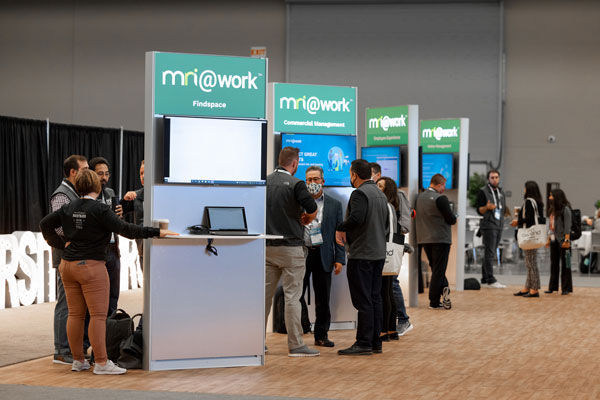
Technology has evolved by leaps and bounds since the ‘70s, and today’s computing power makes it possible for the real estate industry to leverage Artificial Intelligence (AI) like never before. Attendees at this year’s conference saw firsthand how MRI is putting AI at the core of its open and connected approach to software and the significant benefits that the technology has to offer around automation, time savings, operational efficiency and productivity.
MRI’s Ecosystem of visionary partners

One of the best parts of MRI Ascend is the presence and support of MRI Software’s suite of partners and clients, which enables an open and connected ecosystem of software and innovation. Getting together with our partners this year in the MRI Partner Ecosystem was extra special after a year where we’ve all been sitting at home on laptops.
We’d also like to extend our gratitude to those who sponsored the conference, like our good friends at AvidXchange, Nexus Systems, and many others.
Cleveland rocks

2021 marks a special year for MRI, and we couldn’t have been prouder to host our clients and partners in our hometown. Today, MRI is a global technology provider with a presence across North America, EMEA and the APAC regions, but Cleveland is where it all began. It’s still the foundation of our values and our culture – even after 50 years.
As we celebrate the history of PropTech, we’re still looking to the future to deliver the most advanced solutions for our clients, which includes setting our sights on next year’s North American users conference – MRI Ascend New Orleans! The conference will run from October 23 – 26, 2022. Keep an eye on the MRI Ascend website for updates.
Implementing an investment management system: 4 best practices to consider
This blog was written by Josh Malinoff, Principal and CEO at REdirect Consulting.
REdirect, an MRI Software Consulting Partner, is a leading provider of real estate technology solutions with a demonstrated record of assisting hundreds of clients internationally and across the real estate industry to attain their technology and business goals. Learn about how REdirect has helped new and existing MRI clients leverage their software investment.
When you’ve identified the right investment management system for your business, you probably want to jump in right away to start making use of the new, time-saving tools. But consider this “in between” time as an opportunity to review best practices for implementing a new investment management system, while thinking through existing processes, managing risk, data collection, and driving adoption.
Before implementing any system, it is wise to undertake a process review. And given that your investment management system is going to be a major component of your team’s daily work and tasks, we believe a process review prior to implementation is essential.
Assuming you’ve already done a process review and your processes and needs are well-documented, below is an exploration of other factors to consider and how to successfully get started with implementing your new technology.
1. Prepare to automate
Since you are just getting started with your investment management software, it’s likely that you still have some manual, paper-based tasks. Anything that still lives in filing cabinets should be top of your list to automate.
While some of the preparation you’ll need to do here will have been taken care of by the process review, make sure you are mapping processes with a heavy consideration of your future state. This might entail streamlining processes which previously had many touchpoints and limited controls.
For example, your distribution process may currently require offline calculations and manual data entry into your accounting and bank systems. Once automated, the new process will be entirely contained in your investment management system with robust controls, a much faster cycle time, and reduced risk of error.
The goal is to move the bulk of your tasks into the new system. You might be surprised to learn that some processes are easily automated in the system. For example, we find that many investment clients assume they have to do waterfall calculations “manually,” since they are so complex. Believe it or not, you don’t have to continue to manage these calculations within Excel.
The MRI Software real estate investment platform, for instance, has complex functionality to manage waterfall calculations within the system, which helps reduce errors, gain control, and have an easier audit experience.
2. Empower users to take over
Beyond financials and the back office, investor portals can offer a streamlined and better marketed experience for new investors (and extend wallet share with existing investors). CRM capabilities of your investment management system can help you greatly. Be sure to get your self-service portal for investors up and running as early in your fundraising cycle as possible.
As we all know, receiving a quarterly report doesn’t cut it anymore. Modern investors want anytime access to their investment performance and returns. Allowing investors to download reports and check in on investments themselves will save you a lot of time (and emails). These features of the system can also help you market your funds better and accelerate your firm’s growth.
3. Good data is your best friend
Data conversion is always a hot topic because investment management implementations frequently replace manual processes, so the original data does not typically reside in a single system. That original data is often spread across multiple Excel spreadsheets and PDF documents. Because people have their own preferences and habits when it comes to maintaining and manipulating files, we often find inconsistencies in data when stored outside of an investment management system.
This data spread is especially problematic when your staff is working in files with different versions, naming conventions (or lack thereof), and sending files back and forth. Normalizing your data is critical to make sure you retain the historical information that benefits your long term operations and accounting.
MRI Investment Accounting offers a great opportunity to run reports directly without needing to download or manipulate data outside of the system. And fortunately the system can handle both key reporting needs for the funds as well as for your investors. The report design functionality can help you with both internal and external reporting needs. Though configurations in your new system are very personal and specific to your firm, the system is flexible enough to allow your needs to be met without too much tweaking.
4. Manage the change before you “go live”
It is critical to do thorough testing before you completely shift over to your new system. Build “user acceptance testing,” into your plan and timeline. On paper the system might be a great fit, but if your team doesn’t like it, isn’t comfortable using it, or if it just doesn’t fit what they are looking for, you will need to offer some change management. If your existing processes are heavily ingrained, it will take more time and effort to get the team’s buy-in.
It is important to carefully manage change, particularly with users who may be resistant. REdirect’s implementations build in significant hand-holding before the system goes live. We believe this support is essential to ensure the system is being used properly in the long term. User acceptance includes training as well as expectation management. Giving your team a forum to ask questions and practice using the software before it’s live is a great way to get them onboard faster.
Thorough testing also helps ensure that everything in the system functions as it should and that there are no unexpected hiccups once you are live. It is possible and sometimes quite common to take a phased approach with your go-live. You may choose to exclude funds that are winding down in the nearterm, and move new and upcoming funds onto the new system. This phased approach can offer an interesting ROI example when you can see the systems side by side.
If you become overwhelmed by the process of configuring and populating your system, undertaking data collection and normalization, or making specific and strategic analysis considerations, working with a consulting firm can streamline a lot of those struggles.
REdirect Consulting is one of the leading experts on implementing investment management software solutions and can aid in any (and all) steps of the process, from full implementation and customizations, to training and ongoing support. If you have any questions about the next steps for your firm’s technology, reach out to us here.
Modernize your commercial property marketing with Findspace from MRI Software
Like many aspects of the real estate industry, the process of leasing commercial properties has shifted to the digital space. In today’s market, tenants expect quick and easy access to your property information – including listing details, photos, and virtual tours – on any device they might be using. Delivering great experiences that meet these expectations can be tough on marketing teams, requiring constant contact with brokers and prospects as well as cross-department collaboration that can slow the process down.
Marketing your commercial space in the digital age should be as easy for you as it is for your prospects. With Findspace from MRI Software, you can present all your available properties to brokers, prospects, and other viewers on your own website in an engaging format.
Showcase your commercial portfolio to brokers and prospects
Brokers have come to rely more and more on online tools to help them connect leasing agents to properties that suit their needs, and making sure these brokers are able to see information on your available properties is crucial. Findspace gives commercial owners and managers the ability to display the full breadth of the portfolio to brokers in an easy-to-use, searchable format.
Findspace cuts down on manual marketing as it gives website visitors the ability to search for properties by location, square footage requirements and asset type to sort through your portfolio – all in a platform that integrates directly with your brand website. By uploading all photos, video footage, and virtual 360° images into the platform, Findspace organizes the property information and develops easy to read listings, complete with auto-generated brochures that brokers can download and customize for their own needs.
When it comes to keeping prospects up to date on your portfolio, your marketing team wants to ensure that the right people can see all the necessary property information both today and in the future, which is why brokers can use the Findspace platform on your website to “subscribe” to different properties based on asset type, location, and more. From that point on, they’ll receive alerts whenever there are new updates to that space.
Bridge information gaps between internal teams
In addition to presenting all your necessary portfolio data to brokers and prospects who might be interested, Findspace gives you full control over that data in one centralized tool, allowing you to pick and choose what gets pushed out publicly and when. Manage your buildings in the environment by selecting and deselecting what properties you want to show. If you have a space that might have a vacancy in the future, you can use Findspace to identify when that space will be available and then schedule a posting for that time.
When all the information for these properties is pulled into the Findspace content management system, you’ll have effectively established a link between the marketing team and the leasing team, with each team having easy access to the data. All the information stays in an internal-facing, secure environment that allows easy access from across the business.
In an age when commercial real estate is becoming more of an online process, Findspace brings your leasing operations into the digital space in a way that’s easy-to-use for your marketing team, your leasing team, and your prospects. Learn more about Findspace in this demonstration.
MRI Software wins 2021 Stevie® Award!
MRI Software is thrilled to announce that we’ve won a Stevie® Award for the fourth time in the Large Computer Software Company of the Year category! For the past 50 years, we’ve taken pride in our ability to come together as one company with the best and most enthusiastic employees to deliver excellent software, services and support to our clients. As we continue throughout another year of tremendous growth, we’re honored to receive another Stevie Award as a result of our efforts.
Helping clients innovate for the future
Since 2019, MRI has expanded its technology solutions for real estate owners, operators and occupiers through new product launches, enhancements to existing offerings, and strategic acquisitions. MRI’s solutions help businesses respond to the challenges of COVID-19 and plan for the future by using technology to embrace digital operations and prepare for the return to the office. MRI is proud to be a PropTech industry pioneer that helps clients plan for the future by becoming technology visionaries through the execution of several key strategies including:
Transition to digital services – When the pandemic forced a sudden shift from in-person to online operations, MRI clients had access to software that allowed them to easily transition to virtual processes and maintain business continuity — from collecting rent payments online to managing the leasing process virtually and collecting digital signatures.
Reinvent the workplace – As a “new normal” rears its head, MRI has been at the forefront of helping real estate occupiers and landlords adjust to and navigate changes in space requirements, lease agreements and contracts. With space scheduling software and tools that help manage employees and visitors in the physical office, MRI is offering clients a way to reinvent the workplace for their business needs.
Forging a path forward together
This award underlines MRI’s understanding of where the real estate industry has been headed with or without the pandemic. Having the right technology in place will not only enable real estate organizations to preserve business continuity in the short term as they return to the office – it will position forward-thinking companies as industry visionaries that are able to thrive in the face of change. As we move forward into an era where the workplace experience will be more varied than ever, MRI is committed to both innovation and an open and connected approach to real estate software. Learn how you can become part of our award-winning team.