Top 4 technologies to help employees feel safe as they return to work

It is fair to say that lockdown in the UK has been a strange and testing time with over 35% of Brits doing some form of working from home. However, with lockdown restrictions easing since 19 July 2021 people are starting to return to their workplaces, but with this comes a big challenge that businesses face in adapting office environments to a different way of working.

But with over five million people fearing returning to work what will this look like? Without a doubt, there will be plenty of new safety protocols involving strict personal hygiene and physical distancing, but how do we make this transition as simple and as safe as possible?

As employers, we are all navigating a different territory. The workplace we left many months ago is unlikely to be the same when we return. We haven’t experienced anything like this before, most organisations don’t have plans in place on how to return to the workplace and if they do, they haven’t been tested and in these unprecedented times the reality is likely to be very different.

Using technology to keep your employees safe

Companies across the UK face so many challenges when it comes to opening their offices again, it can be hard to know the best way to ensure employee welfare is maintained.  We’ve pulled together the top 4 features to look out for in any people presence software:

Employee and guest screening

Screening all employees and guests before they come on-site ensures only those that meet your on-site criteria are granted access. Giving you and your employees confidence that only those people who meet your organisations wellness criteria are able to gain access.

It’s also incredibly beneficial to get alerted when you encounter a person who does not meet your criteria so they can be added to a watchlist and automatically denied should they attempt to gain access.

Touchless sign in/out

The less surfaces we all touch in the workplace the better for slowing the spread of germs. Ensure your software has the option for employees and guests to enter and exit your location using a touchless kiosk, QR code poster, mobile app or via the front of house team. These systems reduce health risks, improve overall hygiene, and create peace of mind for anyone entering or exiting your organisation.

On-site policy acknowledgement

To maintain the highest level of hygiene for your employees and guests. Having the ability to ask everyone entering your location to read and acknowledge your onsite policies. This could be as simple as asking them to agree that they will use hand sanitiser or keep 2 meters from another person. Ensure that any question not answered correctly someone in your team can be notified and access to denied.

Limit numbers on-site

Automatically set the number of people allowed to be on-site at any one time rather than leaving it up to an individual. This feature removes the responsibility on the  front of house team or security team ensuring anyone attempting to gain access when on-site numbers are met are denied and one of your employees are notified. A great feature for managing on-site social distancing.

MRI OnLocation offers these and other features to help you keep your organisation and those within it safe and secure. To learn more, get a demo.

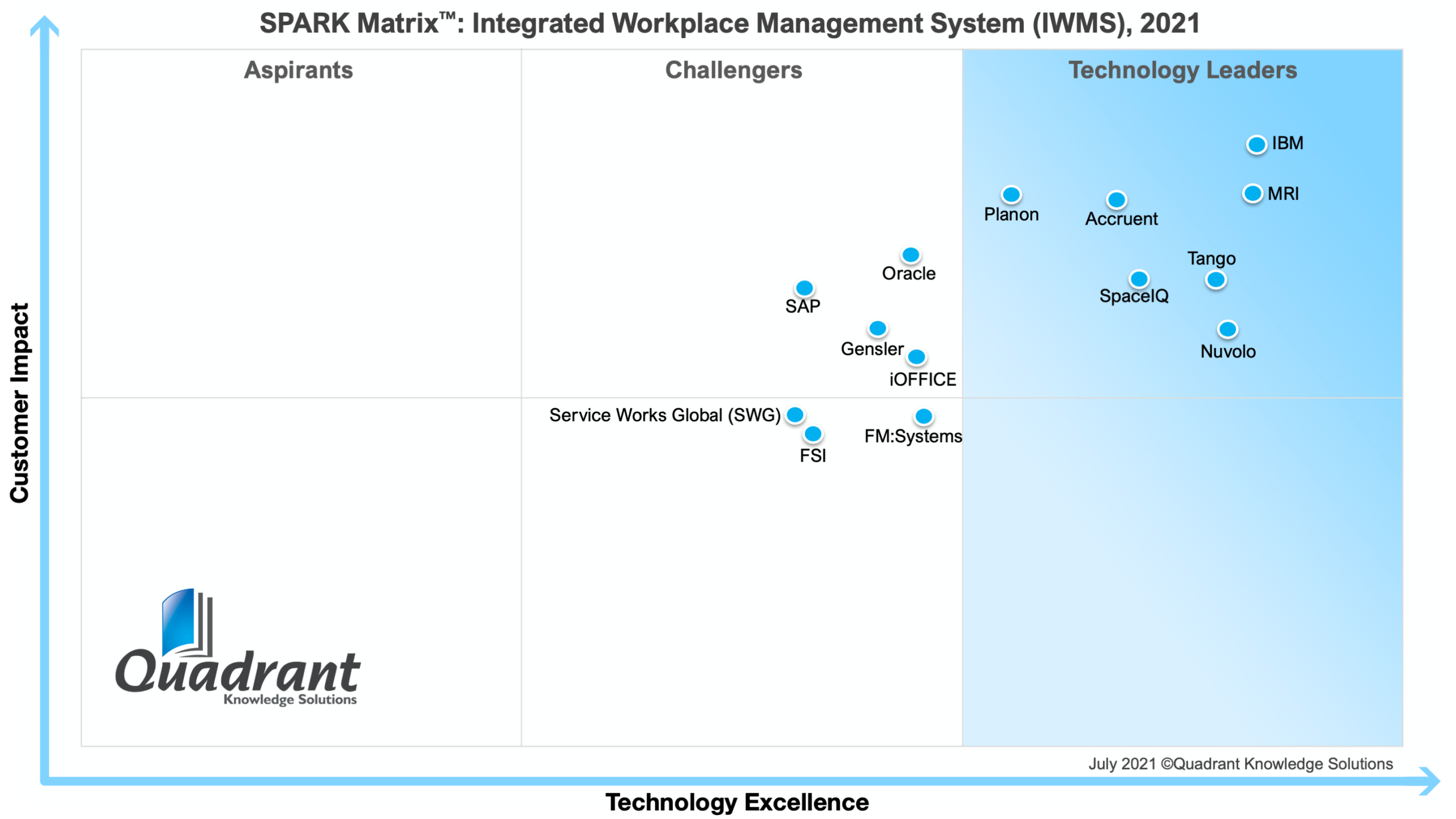
Quadrant names MRI Software a Technology Leader in Integrated Workplace Management Systems

We’re proud to announce that MRI Software has been recognized as a Technology Leader in the SPARK MatrixTM: Integrated Workplace Management Systems Research, 2021 from Quadrant Knowledge Solutions.

Quadrant Knowledge Solutions, a global advisory and consulting firm, conducts strategic research each year to determine the capabilities of each organization and their ranking and positioning for Technology Excellence and Customer Impact. MRI’s designation of Technology Leader is an affirmation of MRI’s commitment to provide organizations with advanced technology that enables them to become visionaries within their industry.

MRI Software IWMS

Equipping clients to be visionaries for tomorrow

MRI pioneered the real estate software industry in 1971, and since then, we’ve provided innovative solutions to forward-thinking technology decision makers so that they can both meet today’s challenges and prepare to overcome the challenges of the future. Even after 50 years, MRI remains a technology leader by being a champion of open and flexible solutions that allow companies to work the way they want.

As proven by the disruptive events of 2020, technology that allows real estate businesses to remain flexible will be the way forward for the real estate industry. In physically separating people from their offices, their employers, and each other, the pandemic has forced organizations across the globe to create connection and flexibility with technology. MRI Software has been helping our clients do that for 50 years, and as a Technology Leader, we will keep arming clients with the solutions they need to succeed in the future.

Learn more about MRI’s Integrated Workplace Management System and how it can benefit your organization.

Key accounting factors to consider when making lease modifications

In the aftermath of the pandemic, many organizations are re-evaluating the amount of available workspace in their leases, whether for space management or financial reasons. This requires real estate accountants to modify leases properly and stay compliant with GAAP and lease accounting processes.

What is a modification of a lease under GAAP?

Any changes to your financial obligation during the term of the lease will cause a modification to your lease accounting capitalization schedule from the date you realize the change until the end of the term. Modifying a capitalization schedule may require a different set of calculations than your original lease schedule. When you modify your lease schedule due to a change in the term of the lease, or a change to the liability, you can change the discount rate to be based on the new/remaining term.

Common examples of lease modification triggers include:

  • Early renewals
  • Extension of lease
  • Cancel early
  • Contraction
  • Each time you receive an allowance payment from the landlord
  • Blend & extend
  • Rent tied to outside index (CPI) – Different rules for FASB & IASB
  • Renegotiate your rent
  • Expansion – Creates a new ROU Asset, therefore you will create a new capitalization schedule for the new space as opposed to re-measuring the existing schedule.

Lease accountants need to be aware of what will trigger a lease modification and how to properly account for it. Be sure to work with your legal team and management to ensure all lease changes are accurately and completely included in your financial information.

Accounting questions to ask yourself before entering a lease modification

The current trend of re-evaluating available workspace and leases means that lease accountants need to ensure they’re following compliance guidelines and best practices under ASC 842.

Here are four accounting factors to consider before modifying a lease.

1) Dates – What is the effective date of the modification?

The date in which the modification becomes effective is important when you are entering changes under the new standard. Your accounting policy will dictate when the negotiations are considered final, whether it’s in writing or verbally, and this will become your modification date. There is usually a gap between the official modification date and the effective date of the changes in terms. This impacts the recognition of the measurement of lease liability and ROU asset. For example, a lease extension is being negotiated to start in September 2021 but is signed in July 2021. The effective date of the modification will be July 2021 and all financial information should be adjusted as of that date.

Be careful around quarter or year end reporting and make sure all changes in those periods are included by gathering all pending lease modifications from legal or lease administration. It’s important to use the correct date of modification because it determines what interest rates you use, what expenses are recalculated for the remainder of the lease, and the new liability and corresponding ROU asset.

2) Costs – How will a change in lease expense affect my financial balances? How will current interest rates affect my lease accounting when I modify?

Any increase or decrease in your overall cash payments for the existing lease are going to directly impact the liability and asset on your books. Additionally, the modification date will dictate the interest rate to use on the new liability as noted above. The new lease liability will be remeasured as of the effective date of modification using the new interest rate and lease payments. Any difference in the liability from what’s been previously recorded will be adjusted against the ROU asset.

3) Increasing or reducing existing space – How will my accounting numbers change as I downsize or increase my available workspace?

Often, an existing lease will be modified for the addition of space, which changes the terms of the original lease and a brand-new lease is papered for the same property. For accounting purposes, we can treat this as a new lease with a corresponding interest rate as of the “new lease” date for all the new space. The new lease will begin immediately following the end of the old one.

If an existing lease is continuing with no changes and additional space is being leased from the same landlord, then the new space should be accounted for as a new lease with current interest rates, and the existing lease should remain unchanged. These will be treated as separate leases under their respective terms.

Any reductions in lease space would be considered partial terminations and the liability and ROU asset must be reduced as of the effective date of the modification. This may also result in a gain or loss for any difference in reduction of the lease liability as compared to the reduction of the right-of-use asset.

4) Lease term – What if I am extending my lease term? Will I include options on the modification? How are my balances impacted by a reduction in term?

If you are extending a lease, the effective date of the modification will dictate the new interest rate which will be used to calculate the liability and adjust the ROU asset. This should not be accounted for as a new lease, but as a modification. Consider if any options were previously included as reasonably certain upon adoption before adding the new amounts, as they would have already been included in your balances.

A reduction in lease term will result in a modification of the liability and asset that is less than you have recorded. Any early terminations may result in a gain or loss for any difference in the reduction of the lease liability as compared to the reduction of the right-of-use asset.

If you are modifying a lease to end earlier and you had previously included options that were not exercised, you will have a decrease in the liability and potentially an adjustment to expense for the inclusion of the option payments in the original liability. Reasonably certain options that may have been included upon adoption potentially are not deemed certain upon modification of the lease due to new economic circumstances and will need to be considered for the modification.

Using software to simplify the lease modification accounting process

Utilizing purpose-built software can make it easier for you to follow the proper processes when entering lease modifications. MRI offers a variety of lease accounting software solutions for both SMB and enterprise organizations that can help you stay in compliance with IFRS 16, IASB, GASB, and FASB requirements. Keep your organization in good standing with software that simplifies journal entries for rent concessions, capitalization schedules for payments and asset management, and audit trails to easily access and review your data. See how MRI’s lease accounting solutions can benefit your business in the aftermath of COVID-19 and beyond.

A hybrid style of work is here to stay

More so than ever are we working remotely, with employers needing to rethink office space, collaboration, and requirements within the workplace. As the world population slowly becomes vaccinated, questions are arising as to what the future of the workplace will be. A hybrid style of work is attracting attention, with employees having the ability to work in multiple different spaces, including corporate offices, coworking spaces, public spaces, and most commonly, from home.

What is a hybrid style of work?

A hybrid workplace supports every style of work, with employees confirming that at the heart of this is their desire for flexibility. This offers employees a seamless experience and gives them a greater sense of control and freedom with how they work.

Flexible work is here to stay, so it is essential that employers harness this knowledge and create a workspace that aids collaboration and suits the new style of work employees are demanding. Another significant consideration is an increased focus on employee wellbeing, improving inclusion within the workplace, whether a worker is remote or full-time back in the workplace.

What does this mean for your business?

Warren Buffet acknowledged that “the supply and demand for office space has changed significantly … and when change happens in the world, you adjust to it”. Employers that fail to harness this new style of working will fall behind, with this creating an opportunity for companies to validate employees’ concerns and provide an environment where each individual can succeed.

How can MRI OnLocation help?

MRI OnLocation can help to ensure a safe environment for employees choosing to work collaboratively and come into their workplace. We can provide up-to-date information with how many individuals are onsite at once, ensuring that there is a limit to the number of employees within the workplace, guaranteeing that physical distancing occurs.

Health screening questions can also be included for all individuals coming on-site, including custom questions such as ‘Have you experienced flu-like symptoms in the past 14 days?”.

Top 5 benefits of a hybrid workplace

  1. Working from home allows employees to complete uninterrupted work, avoiding distractions that would usually occur within an office. On average, remote workers are 20-25% more effective when working at home, emphasising the success of spending a few days a week at home.
  2. Employers have more time to spend on their own mental health and wellbeing after avoiding commutes to and from work each day, greatly increasing their spare recreational time with family and friends.
  3. Flexible work hours, as employees have the ability to choose the hours they work whilst still ensuring they complete their dedicated 8 hours.
  4. Office spaces can be transformed into more collaborative areas for when employees come into the office, helping to provide the sense of ‘team’ when they are all together.
  5. An increased emphasis on productivity rather than efficiency. Management has switched its focus to supporting team members with the resources they need to complete a project rather than viewing it as simply hours inputted equalling to work output.
  6. Increased savings for employers as office space is required less, therefore decreasing the amount spent on rental costs. Additionally, employees are also saving as they are now spending less time and money on a commute to work.

New to MRI OnLocation?

Get started with a FREE 30-day trial today. No credit card required.

Use MRI OnLocation to meet government and organisational sign-in and contact tracing needs

Most businesses globally are required to display a government-issued QR code which those entering their workplace need to scan. But asking your visitors to sign in to both MRI OnLocation and then a separate process for the government-issued QR code could be viewed as a cumbersome process and poor visitor experience.

Good news, using existing tools available in your MRI OnLocation visitor sign in process you can now combine your standard MRI OnLocation sign in experience with your government-issued QR code.

Government-issued QR code

Governments globally are mandating the use of QR code posters to help with contact tracing. All visitors and employees are required to scan the government-issued QR code with their smartphones before entering a business. In the unfortunate event that a case of COVID-19 is reported, the government can use this data to trace the scope of the community and workplace outbreak and reach out to any close contacts to reduce the likelihood of further transmission.

Complementary protection

By combining the government-issued QR code system with your MRI OnLocation subscription you are adding an additional tool to your risk management strategy. Allowing you to:

  • Screen those coming on-site and identify anyone that may pose a risk to those people in your duty of care; your employees and other guests.
  • Deliver a seamless sign-in experience for your guests.
  • Meet your compliance obligations regarding government-mandated contact tracing without having to choose between the government QR code and your people presence system.
  • Support social distancing guidelines by setting occupancy limits within your MRI OnLocation account. These will then alert you when total occupancy is nearing or has breached, these limits.
  • Easily access comprehensive people presence reporting in the unfortunate event of an alert that your workplace might have been exposed to a person of risk.

How do the two systems work together?

You can choose from three options to combine the two systems depending on the experience you want to offer your employees and guests.

Option 1 – Add the government QR code to your kiosk sign-in process

When employees and guests arrive on-site they:

  1. Follow the normal kiosk sign in process.
  2. Scan the government-issued QR code when presented with the question on the kiosk.
  3. Complete the sign in process.

Option 2 – Add the government QR code to your touchless sign-in process

When employees and guests arrive on-site they:

  1. Scan the QR code on your kiosk/poster to start the touchless sign-in process.
  2. Follow the normal sign in process, at the end direct users to scan the government QR code poster.


Tip: As a back up we recommend having your government QR code poster displayed in your reception and at all entry points for those who can’t sign in using a smartphone.

Option 3 – QR code poster

If you don’t want to make changes to your kiosk sign in process or only use our QR code posters, we have a poster option available. When an employee or guest arrives on-site they will need to follow the steps on the poster:

  • Scan the government QR code.
  • Scan the MRI OnLocation QR code and enter their details, answering any questions required to complete your normal sign-in process.

To add your unique QR codes and branding to the poster we have created a design file you can edit.

Get the poster

Commonly asked questions

What if I already use a visitor management system can’t I provide a report from this? Unfortunately, the new rules require organisations to use government-issued QR code. Remember, the government contact tracing systems are not visitor management systems. They do not ask visitors to select a host, they do not capture other information like vehicle parking details, or ask the visitor to sign waivers or NDA’s or any of the other common visitor management workflows.

Your visitor management system will give you detailed information of who came on-site and who they met with, it’s important to remember the government does not want to have to look through every organisation’s visitor management reporting, which will differ from customer to customer.

Do any people presence systems integrate with the government-issued QR codes? Not with the government-mandated QR code systems, we are aware of.

Will MRI OnLocation be integrated with the government-issued QR code systems? No, the government-mandated QR codes are intended for government contact tracing only. This is to help officials easily track and contain an outbreak from a single system. However, you can use the government-issued QR code service alongside MRI OnLocation.

Need help getting set up or have additional questions?


Please reach out to our friendly team.

4 commercial real estate metrics to drive financial success

In an era where real estate firms are inundated with data, it can be hard to know what data is most important to your business, and it can be even harder to uncover that information in the first place. CFOs and Controllers in real estate firms need to track commercial real estate metrics to ensure the success of the business, but gathering all the necessary data to calculate key metrics is difficult as it can be scattered across the organization. With all the manual work it takes to track down data, the metrics will likely be out of date by the time you get around to using them.

With a business intelligence and analytics solution, commercial real estate firms can visualize their current business metrics, monitor KPIs and drill down to the granular details to make strategic data-driven decisions and deliver for investors.

Here are just a few of the financial metrics that your commercial real estate firm can and should be tracking with an analytics solution:

1. NOI

The right analytics solution can not only give you a visual representation of your net operating income – it can also show you the underlying metrics that influence it, like capital and operating expenditures. With the capability to drill into these stats, you can better understand the ways in which they impact your business and better identify how best to prioritize your organization’s time.

2. Receivables tracking

All businesses have certain expectations when it comes to payments from their tenants, and with the power to keep track of your receivables in an easily accessible dashboard view, you’ll be able to identify late payments and assess risk and impact to cash flow based on that information.

3. Budgets vs. actuals

Your organization’s budgets are designed to meet the strategic goals of the business, and by not tracking to those budgets, you run the risk of missing your marks. With an analytics solution, you’ll be able to gain visibility into deviations and track your budget against your actuals, without the hassle of digging through data. Comprehensive dashboards can provide relevant information tailored to your business and personalized needs while still giving you the flexibility to expand upon them if necessary.

4. Occupancy

A high-level view of your occupancy rates gives you not only a better understanding of your tenants, but a more thorough picture of how your space is being used. A solution that helps you visualize occupancy metrics and tenant mix can equip your business with a new understanding of the relationship between your leases and your physical space, instilling more confidence in your strategic planning.

Visualize CRE metrics with analytics tools

A powerful business intelligence and analytics solution can give you a more detailed view of the CRE metrics within your organization, equipping you with the ability to make data-driven decisions and measure success. Learn how MRI Analytix Portal and Data Store arms your business with the ability to assess trends and identify outliers and prepares you to become a data visionary.

Working from home, and the desire for social interaction

A vast majority of employees surveyed voiced opinions of their desire to regain daily interaction with colleagues, along with wanting to maintain relationships with clients and stakeholders. However, to return safely to the workplace, protective measures will need to be considered to ensure that each worker feels safe and comfortable in their office environment. How can MRI OnLocation help?

Daily contract tracing

Contract tracing is a core disease control measure, helping to prevent further transmission of the virus by quickly identifying and notifying people who may be infected and contagious.

MRI OnLocation has the ability to track all individuals who have entered the building in one day, and therefore the employer can notify any individual who came in contact with an infected person in their building.

Limiting number of people on site

39% of respondents indicated that limiting the number of individuals onsite would also ease concerns of returning to the workplace, ensuring that social distancing occurred. With MRI OnLocation, employers can set a maximum occupancy to limit the number of people that are permitted on-site, and once the limit is reached any further attempts to sign in will fail.

With features like contract tracing and limiting the number of occupants in a workplace, employees can return with confidence that they will remain safe throughout this continuing pandemic. This enables collaboration and connection between workers to resume, with CEO of Apple expressing that working from home is “not like being together physically… I can’t wait for everybody to be able to come back into the office.”

Touchless entry/exit

Touchless entry and exit reduces the spread of germs by eliminating the risk of transmission through high-touch surfaces, with MRI OnLocation offering touchless entry for employees, contractors, and visitors. 30% of respondents indicated that touch-free sign-in and out would be highly valued, helping to minimise the risk of spreading the virus, and reducing wait times. Visitors will have the ability to sign in using our OnLocation mobile app or scan a QR code and sign in from their smartphone’s browser. No app download required.

Part three of this series focuses on a hybrid workplace, follow along to hear how MRI OnLocation can help your company

New to MRI OnLocation?

Get started with a FREE 30 day trial today. No credit card required.

How to calculate the Internal Rate of Return and what it means for the real estate industry

For commercial real estate investors and owners, mitigating risk requires making informed decisions based not only on accurate data, but also on the projected return on investment and rate of return. One such tool asset managers can use to assess the value of a given investment is the internal rate of return (IRR) formula.

Even if your current processes and operations include knowing how to calculate IRR, understanding its purpose and how it’s being used in the real estate industry can help guide you in the use of the formula.

What is internal rate of return and why is it important for real estate?

Before investing in a property, real estate investors need to know if that project will deliver profitable returns. In its simplest form, IRR is the percent that an investor will earn if a certain project performs as expected.

This statistic is important for commercial businesses with multiple properties managed by separate parties because it gives a better picture of what your investments might yield, allowing your business to make the determination as to whether a project is worth the time and effort. Calculating IRR requires an input of real data based on real assumptions, which means the data you’re using to make assumptions should be rock solid to ensure accurate results.

How to calculate the Internal Rate of Return

One way to determine the internal rate of return on a project is to calculate it manually by following a set formula. In this formula, the expected cash flows for your investment are given and the Net Present Value (NPV) equals zero. More information on what that formula looks like in practice can be found here, and once the internal rate of return is determined, your business can put it up against the cost of capital to see the financial value of the project based on your new and existing data.

How IRR is used across real estate

Utilizing the IRR formula can help asset managers in real estate businesses not only assess the value of a property now in comparison to other potential investments, but it can help determine the cost of the project over time and in response to different potential scenarios.

However, most property management systems don’t have the ability to calculate IRR in-system, which leads users to export data from the system into a third-party application, calculate IRR, and then reupload data into their property management systems. Many times, that system can be as unstructured as an excel spreadsheet. The danger in doing this, however, is that the data you plug in to calculate the Internal Rate of Return needs to be as accurate as possible, and whenever you export data into a third-party application that doesn’t integrate with your property management system, errors can come into play quickly.

This problem is exacerbated by the models that many asset managers operate, where employing multiple managing agents means that they have to manually model IRR from multiple disparate data sources. This makes forming a true comparison of IRR across different assets a challenge, often consuming the time and effort of at least one staff member per year.

For asset managers in the real estate industry, knowing how to calculate IRR is becoming an important part of the job. Calculating IRR with a tool that doesn’t integrate with your processes, however, can create increased risk for your business. Learn how MRI Investment Central can integrate with your property management system, keeping all your data on the same track and giving you confidence in your calculations.