
We all know employee engagement is good for business. Research by the Hay Group found that high levels of engagement can boost revenue growth by up to two and a half times. But how can companies make sure their employees are happy? Continue reading “Performance Enhancer: how real estate software can turn buildings into core productivity enablers”
Employing a lone worker? Here are 10 apps that have got your back
Employees that work alone often lack the safety or backup of those around them should they face confrontation, injury, or otherwise require assistance. In many countries, the law requires employers to carefully consider and then mitigate the health and safety risks to employees working alone. Although working alone is synonymous with contractors and employees in isolated or remote locations, in the eyes of the law, it’s possible to be surrounded by a thousand people and still be working alone. By definition a lone worker can actually include:
- Staff on the night shift working in petrol stations
- Contractors working inside occupied premises but in isolation of any close or direct supervision
- Delivery workers
- Cleaners
- Repair staff
- Security guards on lone patrol
- Workers involved in construction
- Miners
- Maintenance and repair staff in the field
- Agricultural and forestry workers
- Telecommunications technicians
- Rural delivery drivers
- Social and medical workers
- Estate agents
- And many more…
Managing the risks associated with employees and contractors working alone can be a challenge. Luckily, there is a wide range of apps and services available to help organizations reduce the chances of lone worker injury or loss of life.
This is not an ‘exhaustive’ or a ‘best of’ list but here are 10 great apps available globally that offer a wide range of features and services to help you get ahead of Lone Worker health and safety, and compliance.
- Crystalball
- Grace Industries
- Guardian24
- Lone Alert
- ProTELEC CheckMate
- SoloProtect
- StaySafeApp
- SaferMe
- Tracetrak
- WhosOnLocation – Lone Worker Management
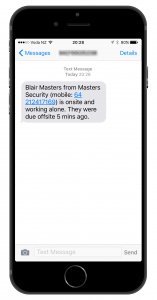
Above: MRI OnLocation can send you an SMS or email alert to notify you when someone has exceeded their expected duration on-site.
Some common ways organizations manage the health and safety of their Lone Workers are:
- Systematic Risk Assessments
- Developing a Lone Worker Policy
- Implementing a Buddy System
- Lone Worker Training
- Conflict Management Training
- Using monitoring systems and equipment (Panic Alarms, Mandown (fall/impact) Detectors, Pendant Trackers, and GPS Mobile Apps
- Inductions specific to lone worker
Some apps, like MRI OnLocation, or Guardian24’s mobile app, leverage a worker’s smartphone. Others, like SoloProtect’s Identicom, or Grace Industries require a worker to carry a specific, fit-for-purpose device. Each app addresses different Lone Worker situations and needs, such as Lone Worker monitoring.
Regardless of what requirements organisations need to address the safety and security of their Lone Workers, there is a solution that will meet the requirements of most organizations within the huge range apps and services now available.
Clear View: using dashboards to shed light on your retail space
Retail property investors and their real estate teams handle one of the more complex and fluid areas of site management.
Not only do they need to monitor and improve the overall venue, they also need to evaluate the success of every tenant to control rents and plan for the future. Continue reading “Clear View: using dashboards to shed light on your retail space”
Laying the foundations for the digital workplace
Digital technologies are having a huge impact on the way corporate real estate is arranged, managed and maintained. In this slideshare presentation we take a look at the implications for real estate and facilities management teams.
Technology has a huge impact on the way real estate is managed and maintained. Digital technology and processes are changing work and improving environments for CRE and FM teams.
From operating and maintaining real estate efficiently, through to providing an accurate view of data about a building, the right technologies and processes can be empowering. CRE and FM teams need to take advantage of Big Data, the cloud, mobile apps, and software as a solution.
Before they take the digital leap, teams need to get the foundations in place so they can start their digital journey with confidence. There are a number of crucial questions that need to be answered by businesses, before preparation for the digital workplace can begin. The slideshare above outlines what these questions are, as well as the opportunities and implications for CRE and facility management teams.
Digital Real Estate: How the latest real estate technology will shape the future
Is your business ready for a digital future? From big data and the Internet of Things, through to the Cloud and mobile apps, what are the technology trends in the real estate sector that are making waves right now? Continue reading “Digital Real Estate: How the latest real estate technology will shape the future”
A Date with Big Data: first steps into property management software for real estate investors
Retail property management is as much to do with people as it is with bricks and mortar. That’s why understanding customer buying habits in detail is needed for retail property investors and their tenants to remain profitable. Continue reading “A Date with Big Data: first steps into property management software for real estate investors”
How to gain sign off for a new CAFM software system
Budget holders are likely to scrutinise all costs you incur – that is their job after all. So they need to be convinced about the importance of each purchase before proceeding. A new CAFM software system can be a significant investment so is no different.
However, a recent survey by the Access Group has highlighted that almost half of UK employees (48 per cent) waste three hours or more a day working with inefficient systems, which costs the average business at least £28,000 a year. The survey also reveals that over half of respondents (51 per cent) are not confident in the accuracy of data within their company’s systems. So, really, the question is can you, as a business, afford not to implement an effective CAFM system which – if done correctly – enables your business to overcome all these issues and more?
Although you may know this, the same is unlikely to be true of all your colleagues. So you will need to convince others round to your point of view.
Most FM professionals, by the very nature of their positions, also do not tend to have significant experience of purchasing services such as CAFM software. As a result, they may not fully appreciate exactly what buying cycles of this nature entail.
We have written a guide to provide assistance with this part of the process, which explains in detail how to put together a compelling business case to support the purchase of a new facilities management system. This includes a summary of what a business case is and the key points it should include. ROI is obviously a crucial factor, which is why we include an example of a cost benefit analysis chart for you to follow.
Key points to highlight include:
- Senior staff not having to carry out administrative tasks
- Implementation of an effective preventative maintenance schedule resulting in fewer breakdowns and longer asset lifecycles
- Smarter task scheduling resulting in less time wasted by travelling between jobs
- Improved stock control meaning minimal asset wastage
- Time saving benefits offered by mobile apps allowing engineers to complete jobs quickly out in the field
No longer be caught out by the complexity of the buying cycle. Know what to expect and how to convince people that an investment in CAFM software can offer your business many benefits and – moreover – pay for itself within months.
CAFM Manager – nominated as 1 of top 5 careers in FM
We have recently come across an interesting article on a software advice blog on careers in FM.
http://blog.softwareadvice.com/articles/cafm/top-5-careers-in-facility-management-1021612/
Noticeably a CAFM Manager is chosen as one of the top 5 careers in FM, the article explains how in demand this role is becoming as “more and more, facilities are relying on state-of-the-art automation systems and technologies” and goes on to state having someone in this role is a “huge asset”.
As many Planet users are CAFM Managers we all know the importance of FM software and are pleased this has been highlighted in this article and shows appreciation for all the many CAFM managers out there! Indeed the other careers in the post are also Planet and CAFM users – so it is another good recognition of the FM profession in general.