
Whiteboard Wednesday – Prospect Communications with MRI Engage Interact (formerly Callmax)
In this week’s episode, Leanne Bradley, Product Owner for Engage Interact, talks about how property managers can engage with potential residents with Engage Interact. Leanne talks about the entire suite of communications products for property manager communications including: text messages, web chat, automated apartment answering service and surveys. Leanne also shows how current customers of MRI’s property management software for multifamily can use Engage Interact to seamlessly sync prospect information.
Video Transcription
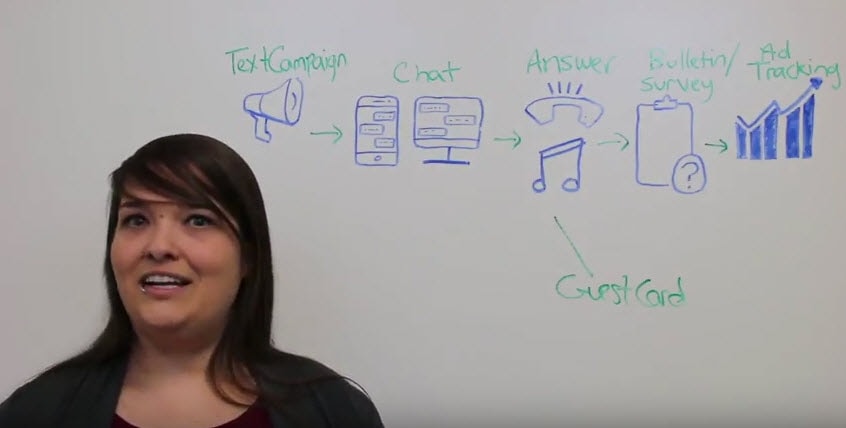
Leanne: Hi, everyone. I’m Leanne Bradley. I’m the product owner for Engage Interact. For today’s episode of Whiteboard Wednesday, I’m going to talk to you about how you can interact with prospects using Engage Interact. The first way that you can engage prospects is with text campaigns. You can try this up for yourself. Just text the word “info” to 216-600-1444.
You can set up as many keywords as you want and each keyword can be set up with your property-specific responses. Whatever you want your info to be, that’s what will be sent to the prospect. Then once you have received a text through a text campaign, it’s going to show up in your chat window on the Engage Interact website. From here, you can either let them continue to play with the keywords, they can see what else is out there, what other information they can get there, or you can just jump right in and start a conversation real-time.
Engage Interact also offers web chat which is a multifamily website chatbot plugin that you can install on your property website. So as a prospect is browsing your website, they can see that somebody is available to talk to, and they can engage with your leasing staff real-time. This integration is also already built-in to the MRI Connect Suite. If you’re using Market Connect, or Prospect Connect, or Resident Connect, you can use this integration already.
Then once they’ve decided that they want to know more and have a conversation, they will call your property. You may not be available to answer, and that’s where answers going to jump in. You can set up a property-specific script where you’ll be able to relay all of the information about your property. You can set up information about your pet policy, any amenities, where you’re located, what school district you’re in, all of that information is customized specifically for your property, and speech recognition software will recognize what the resident or the prospect is asking for, and give them that information.
On the Engage Interact website, you’ll be able to see that they have called in, asking for leasing information, and again for those of you who are using our property management software, you can automatically create a guest card from Engage Interact, and it’ll show up in MRI for you. Then once the prospect has come in, they’ve visited the property, they love it, you can use the bulletin to send them a follow-up. You can thank them for coming to visit, you can provide any information that you weren’t able to give them when they were at the property, and they can come back to you. If you’re using surveys, you can ask them questions, you can get their feedback, and they can reply back to you, so that you can use that information as you’re moving forward with this relationship.
Finally, we offer ad tracking. So you can set up marketing campaigns, and you can see exactly what marketing campaign is getting the most traffic. [chuckles] You can see where you’re spending your money compared to where you’re getting the most bang for your buck.
This is all available as part of Engage Interact, and that’s all for today’s Whiteboard Wednesday. Thank you.